The first week with a virtual mailbox is oddly satisfying. Envelopes appear on your phone as photos, and every one comes with a row of buttons: open and scan, forward, shred, hold. Then the questions start. Should a bank statement be scanned or shredded? Is it worth forwarding a check? What happens to the paper after you ask for a scan? Understanding your virtual mailbox open and scan options, plus the alternatives next to them, is what turns the service from a novelty into a real system.
This guide walks through each action you will typically see, what actually happens behind the counter when you tap it, how the choices affect cost and speed, and a simple decision rule for the most common types of business mail. Exact features and fees vary by provider, so use this as a framework and confirm the details in your own plan.
How a virtual mailbox handles an envelope
Every item follows the same path before you make a decision. Mail arrives at your street address, staff log it to your account and photograph the outside of the envelope. You get a notification with that image, which shows the sender, the postmark and sometimes the size or weight. Nothing has been opened at this point. The envelope sits in a secure holding area until you choose what to do with it.
That first image is the key to the whole system. In most cases, the sender’s name and return address tell you everything you need to decide. A grocery flyer can be shredded unopened. A letter from your state comptroller deserves a scan. A package from a supplier needs to be held or forwarded.
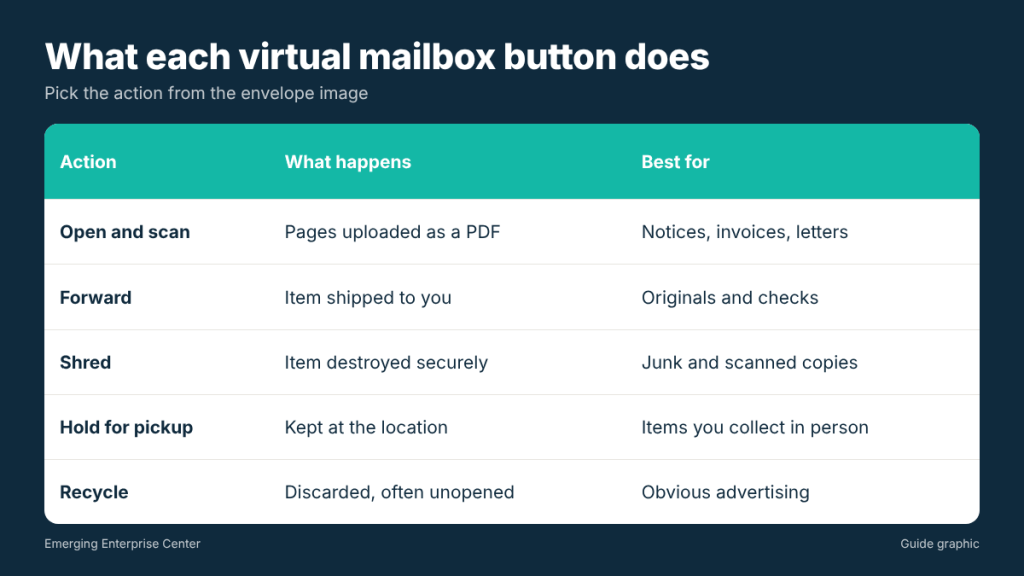
Virtual mailbox open and scan options: what each button does
Open and scan
Staff open the envelope, scan each page and upload a PDF to your account. This is the right choice for anything you need to read: tax notices, bank letters, invoices, legal correspondence and government mail. Ask your provider how many pages a standard scan covers, whether scans are searchable (text-recognized), and how long scanned files stay in your account.
Forward
The physical item is placed in a new envelope or box and shipped to an address you choose. Forwarding makes sense for original documents you must keep, such as titles, signed contracts, replacement cards and checks if you do not use a deposit service. You usually pay postage plus a handling fee, and you choose the shipping speed.
Shred
The item is destroyed securely, often without being opened. Use this for junk mail, duplicate statements and anything you have already scanned and do not need in paper form. Ask whether the provider shreds on site or sends material to a shredding service, and whether there is a log of shredded items.
Hold for pickup
The item stays at the location until you collect it. This option only matters if your mailbox is somewhere you can actually visit, which is one of the main advantages of a local digital mailbox over a remote processing center.
Recycle or discard
Some providers offer a separate recycle option for obvious advertising. It is usually cheaper than shredding and fine for anything that carries no personal or business information.
Check deposit
Some services will deposit checks into your bank account by mail or remote deposit. Rules vary, so confirm how endorsements are handled and how long the process takes.
A decision guide for common business mail
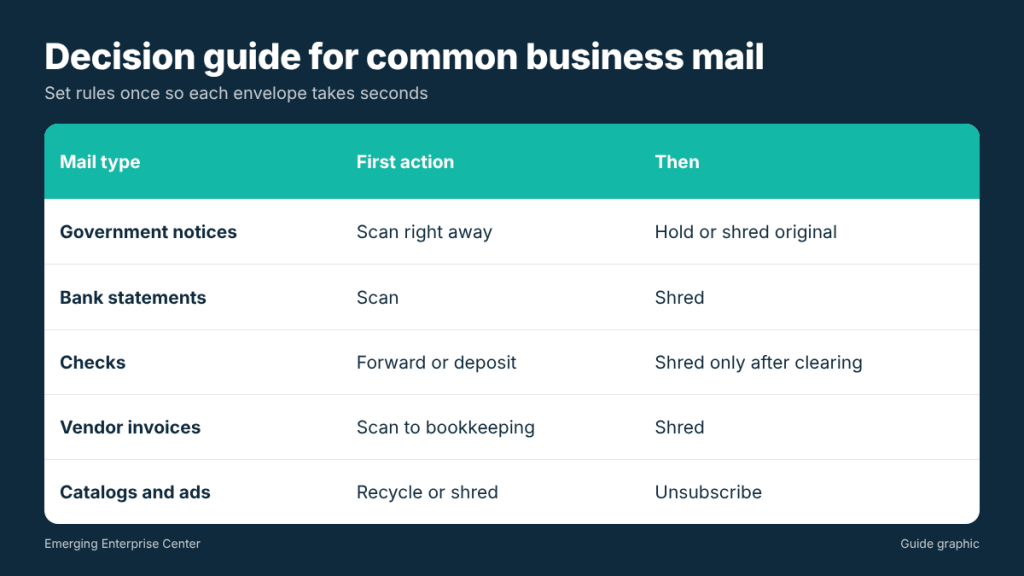
You do not need to think hard about each envelope if you set a few rules in advance. Here is a practical starting point:
- Government notices (IRS, state, county): open and scan right away. Then decide whether to hold or shred the original based on your record-keeping needs.
- Bank and credit card statements: scan, then shred. Most banks also offer online statements, so consider turning off paper delivery.
- Checks: forward, hold for pickup, or use a deposit service. Do not shred until the funds clear.
- Legal documents and contracts with original signatures: scan for a quick read, then forward or hold the original.
- Vendor invoices: scan and send the PDF to your bookkeeping system. Shred the paper once it is recorded.
- Catalogs and advertising: recycle or shred unopened.
- Packages: hold or forward. Some providers will photograph the contents if you ask.
How your choices affect cost
Most plans include a set number of envelope images and a limited number of scans each month, then charge for extras. Forwarding adds postage and a handling fee. Shredding may be free up to a limit. The cheapest way to run a virtual mailbox is to make fewer, smarter requests.
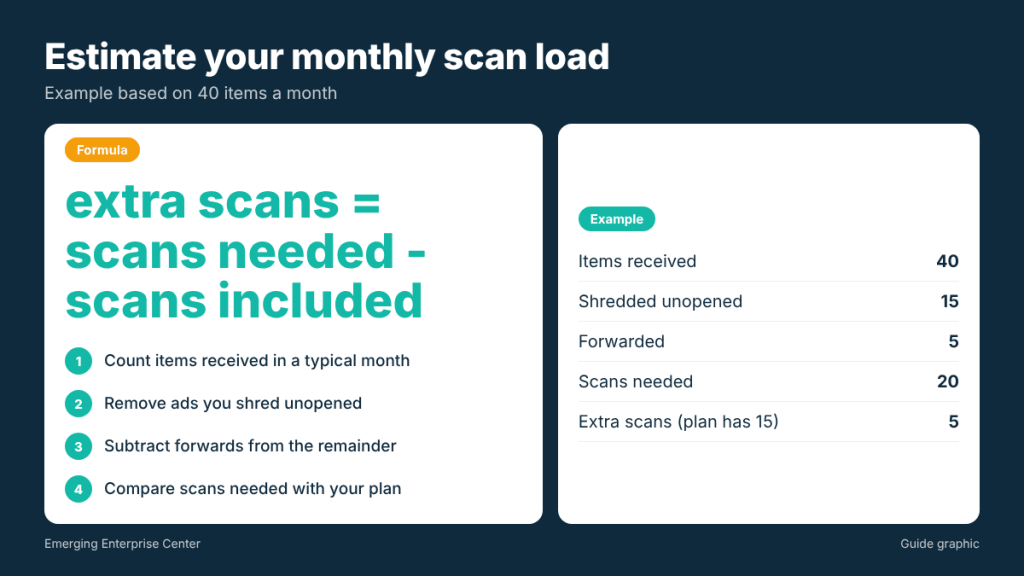
Here is a simple way to estimate your monthly load. Suppose you receive 40 items a month. If 15 are advertising you shred or recycle unopened, 20 need a scan and 5 need forwarding, you will use 20 scans and pay for 5 forwards. If your plan includes 15 scans, you would pay for 5 extra scans (20 minus 15). Batch forwarding helps too: holding 5 items and sending them together in one package usually costs less than 5 separate shipments.
Two other habits keep costs down:
- Unsubscribe from catalogs and switch statements to electronic delivery, so fewer pieces arrive at all.
- Set default rules in your dashboard (for example, auto-shred anything from a known advertiser) if your provider supports them.
Questions to ask before you rely on these options
- Turnaround time. How quickly are envelope images posted, and how quickly are scans completed after you request them?
- Scan quality. Are scans in color, and are they text-searchable?
- Storage. How long are scans kept online, and how long is physical mail held before it is shredded or returned?
- Who opens your mail. Are staff trained and background-checked? Is scanning done in a restricted area?
- Exceptions. How are certified mail, signature-required items and oversized packages handled?
- Pickup. Can you walk in and collect originals the same day if you need to?
Build a weekly routine so mail never piles up
The buttons only help if you use them consistently. Owners who let notifications stack up for a month end up with a backlog, missed deadlines and storage fees. A short weekly routine keeps everything under control:
- Pick one fixed time each week, such as Monday morning, to review every new envelope image.
- Clear the junk first. Shred or recycle advertising so the remaining list is short.
- Request scans in one batch for anything you need to read.
- File each scan the same day into folders such as Tax, Banking, Vendors and Legal, using a consistent file name like “2026-11 Comptroller notice.”
- Queue originals for a single forward or one pickup trip rather than several small ones.
Government notices are the exception to the weekly rhythm. Turn on instant alerts for senders like the IRS or your state agencies so you can act on them the same day.
The last question is easy to overlook. A local digital mailbox gives you every one of these online options, and it also lets you collect an original document in person when timing matters.
Frequently asked questions
Does choosing open and scan mean my mail is read by staff?
Staff handle the pages to scan them, but reputable providers train employees to process mail without reading it and restrict access to the scanning area. Ask your provider about its privacy procedures before you sign up.
What happens to the original after a scan?
It is usually held for a set period, then shredded unless you ask for forwarding or pickup. Check your plan’s holding period so you do not lose an original you need.
Can I scan only the first page of a long document?
Some providers allow partial scans or preview scans. It is a useful way to read a long letter’s key information before paying for a full scan.
Should I shred tax documents after scanning?
Keep originals of anything you may need for an audit or legal matter for as long as your tax professional recommends. For routine statements that are available online, a good scan is often enough.
Prefer scans plus a counter you can visit?
Houston owners can manage mail from an app and still walk in for originals with The Postal Spot’s digital mailbox service near the Galleria.