
Most business paperwork now gets signed with a click. Client contracts, vendor agreements, offer letters and NDAs move through e-signature tools in minutes. Then a bank, a county clerk or a government office asks for a notarized original, and suddenly the click is not enough. Knowing which documents can be signed electronically and which need a notary saves you from rejected filings, re-signed paperwork and last-minute trips.
This guide explains what makes an electronic signature valid, what notarization adds, which kinds of documents usually need each, and a simple way to decide before you send anything out for signature. It closes with practical tips for preparing documents that must be notarized.
What an electronic signature is
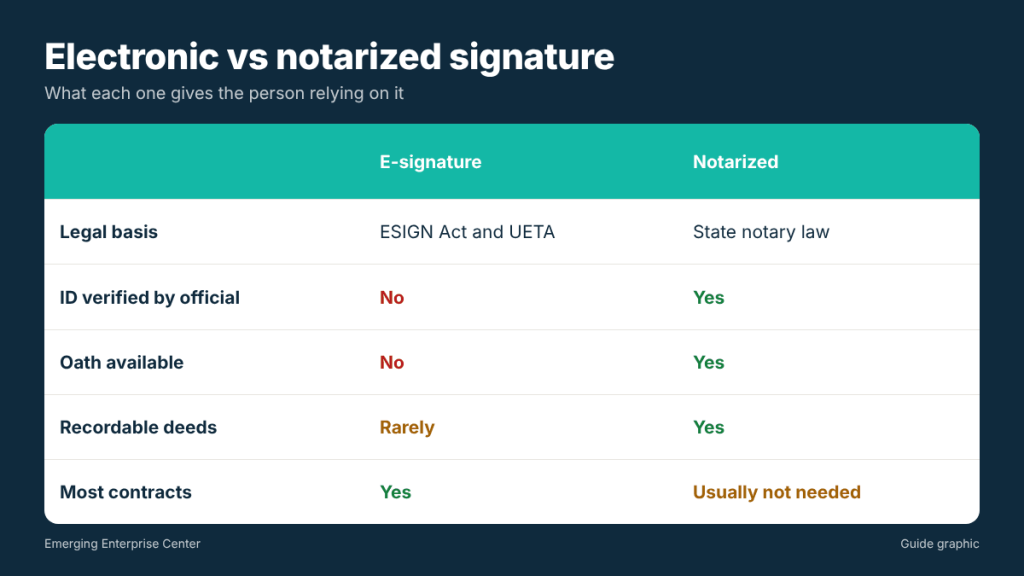
An electronic signature is any electronic sound, symbol or process attached to a record and adopted by a person with the intent to sign. Typing your name, clicking “I agree,” drawing a signature on a touchscreen or using an e-signature platform can all qualify.
In the United States, two laws give electronic signatures legal standing for many transactions:
- The federal ESIGN Act, which says a signature or contract generally cannot be denied legal effect just because it is electronic.
- The Uniform Electronic Transactions Act (UETA), adopted by most states, including Texas, with similar principles at the state level.
Both laws require that the parties agree to do business electronically, and both carve out certain categories. Wills and some other estate documents, certain court documents and specific types of legal notices are commonly excluded or handled under separate rules. If a document falls into a special category, check the requirement before relying on an e-signature.
What a notarized signature adds
Notarization is not just a fancier signature. A notary public is a state-commissioned official who acts as an impartial witness. During a notarization, the notary typically:
- Verifies the signer’s identity, usually with a government-issued photo ID
- Confirms the signer appears to understand the document and is signing willingly
- Administers an oath or affirmation when the document is a sworn statement
- Completes a notarial certificate and applies the notary’s seal
- Records the act in the notary’s record book where required
The result is a document that a third party, such as a county clerk, a bank or a court, can rely on without having to verify the signer themselves. That is why notarization shows up wherever identity fraud would cause serious harm.
Documents that usually work with an e-signature
For most day-to-day business paperwork, an electronic signature is common and accepted, as long as both sides agree:
- Client service agreements, statements of work and proposals
- Vendor and supplier contracts
- Nondisclosure agreements
- Offer letters and many HR acknowledgments
- Commercial leases, in many cases
- Purchase orders and invoices approvals
- Company agreements and internal consents, when your governing documents allow electronic signatures
Documents that often require notarization
These commonly need a notary because the law, the receiving office or the other party requires it:
- Documents to be recorded in county property records, such as deeds, which typically require an acknowledgment
- Affidavits and sworn statements, which require an oath and a jurat
- Powers of attorney in many situations
- Certain vehicle and title paperwork
- Loan and mortgage closing documents
- Forms where the instructions say “must be notarized,” including some bank, government and USPS forms such as Form 1583 when it is not signed in front of a mail store’s authorized staff
When a document requires notarization, an ordinary e-signature on its own will not satisfy the requirement, even if the rest of the document is perfectly valid.
Requirements also come from the other side of the transaction. A bank may insist on a notarized signature card or resolution, a title company may require notarized closing documents, and a government office may only accept a wet-ink original. Even when the law would allow an e-signature, the party receiving the document gets to set its own acceptance rules, so ask early rather than after you have signed.
What about electronic or remote notarization?
Notarization itself can sometimes happen electronically. Texas authorizes electronic and online notarization performed by notaries with the appropriate commission, but not every receiving office accepts every format. If you plan to use an online notarization, confirm with the recipient first. Otherwise, a traditional in-person notarization is the most widely accepted option.
A three-question decision guide
Before you send a document for signature, ask:
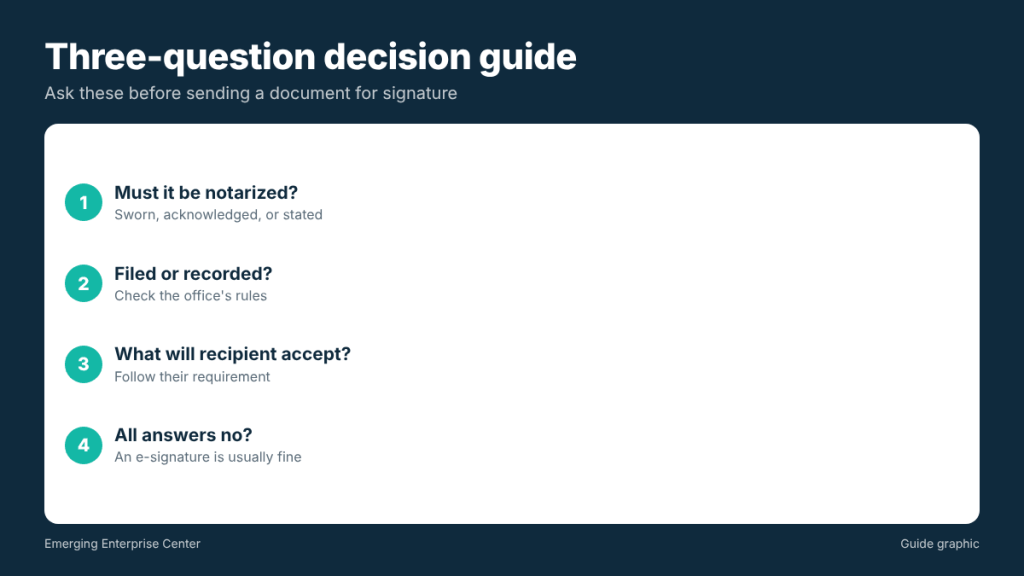
- Does the document or its instructions say it must be notarized, sworn or acknowledged? If yes, plan for a notary.
- Will it be filed or recorded with a government office, court or county clerk? If yes, check that office’s requirements.
- Has the other party (bank, buyer, agency) said what they will accept? If they require a wet signature or notarization, follow their rule.
If the answer to all three is no, an electronic signature is usually fine. If any answer is yes or unclear, ask before signing.
Worked example: one week of paperwork
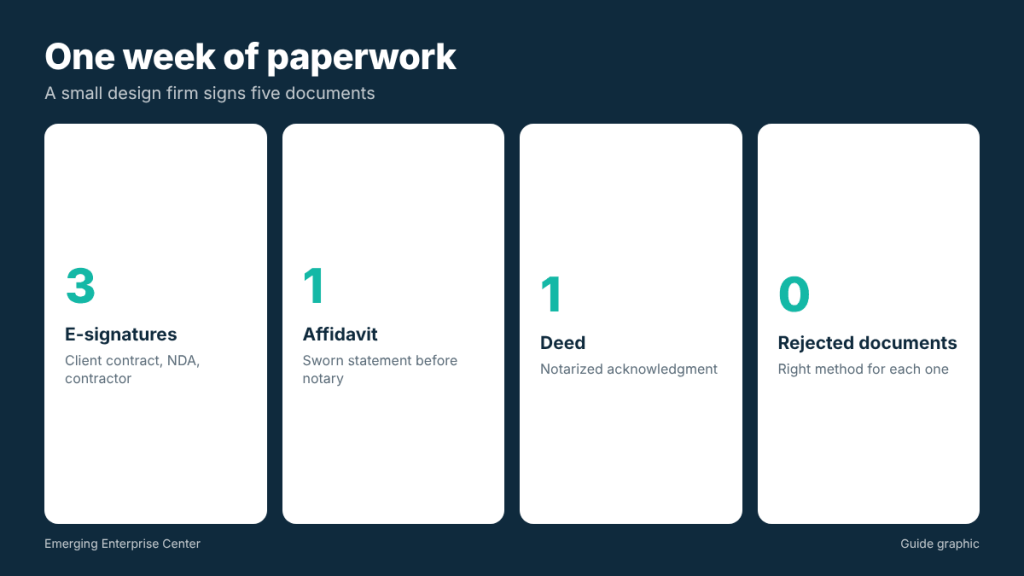
A small Houston design firm signs five documents in a week. The client contract, an NDA and a contractor agreement all go through an e-signature tool. An affidavit for an insurance claim requires a sworn statement, so the owner signs it in front of a notary. A deed for a small office condo the business is buying requires a notarized acknowledgment before recording. Result: three e-signatures, two notarizations, and no rejected paperwork. (3 plus 2 equals 5.)
Making e-signatures hold up
An electronic signature is only as strong as the evidence behind it. If a dispute ever arises, you may need to show who signed, when and how. A few practices make that easy:
- Use a reputable e-signature platform that records an audit trail: email addresses, timestamps and, often, IP addresses for each step.
- Get clear consent to sign electronically, which most platforms build into the signing flow.
- Send to the right person. Confirm the signer’s email address directly, and use the platform’s access code or verification option for higher-value agreements.
- Save the completed package, including the certificate of completion or audit log, not just the signed PDF.
- Check signing authority. If someone signs for a company, confirm their title and authority, just as you would on paper.
For agreements with large sums, real property or significant risk, ask your attorney whether an e-signature is enough or whether a wet signature or notarization is advisable even when not strictly required.
How to prepare a document for notarization
- Do not sign in advance. Many notarizations require you to sign in front of the notary, or to acknowledge your signature in person. Wait until you are there.
- Bring valid photo ID. A current driver’s license, state ID or passport is typical. Make sure the name matches the document.
- Bring the complete document. All pages, not just the signature page.
- Check for a notarial certificate. If the document has no certificate wording, the notary cannot choose one for you; ask the recipient or your attorney which type is needed.
- Bring all signers. Each person whose signature is being notarized usually must appear.
- Know your signing capacity. If you are signing for an LLC, know your title as it should appear.
Frequently asked questions
Is an electronic signature legally binding?
For many transactions, yes, under the ESIGN Act and Texas’s version of UETA, provided the parties agreed to sign electronically and the document is not in an excluded category.
Can I e-sign a document and then get it notarized?
Generally the signature being notarized must be made or acknowledged before the notary. Ask the notary before signing, and bring the unsigned document if in doubt.
Does notarization make a contract more valid?
Not necessarily. Notarization verifies identity and willingness; it does not make a contract’s terms enforceable or fair. Most contracts do not need it.
Who decides whether notarization is required?
The law, the receiving office or the other party. Check the document’s instructions or ask the recipient directly.
This article is general information, not legal advice. Requirements depend on the document and the receiving party; consult an attorney for specific situations.
Need a signature notarized in Houston?
Bring your unsigned document and photo ID to The Postal Spot’s walk-in notary service, no appointment needed.