Small nonprofits run on volunteers, and mail is one of the first things to break when volunteers change. Donation checks go to a former treasurer’s house. The IRS letter confirming your tax status sits in a board member’s kitchen drawer. A grant agreement that needs a signature arrives while the person who checks the PO Box is on vacation. None of this is anyone’s fault. It is simply what happens when an organization’s mail depends on one person’s home or schedule.
A virtual mailbox gives your organization a permanent address that does not move when the board does, and it lets the right people see incoming mail from anywhere. This guide covers why nonprofits use one, how to set it up properly, how to handle donation checks safely, and how to write a short mail policy that survives every officer transition.
Why mail is a weak spot for small nonprofits
Compared with a typical small business, a volunteer-run organization faces a few extra risks:
- Turnover is built in. Officers rotate every year or two, and the mailing address often rotates with them.
- Mail is spread across people. One person handles donations, another handles grants, another handles the state filings, and none of them sees the full picture.
- Checks still matter. Many donors, especially older supporters and foundations, still mail paper checks and expect a timely acknowledgment.
- Official mail has long tails. IRS determination letters, state registrations and grant reports may arrive months apart, and missing one can cause compliance trouble.
- Privacy concerns. Volunteers rarely want their home address printed on donation envelopes, newsletters and public filings.
What a virtual mailbox does for an organization
A virtual or digital mailbox receives mail at a street address, logs each item and shows you an image of the envelope online. Authorized users then choose what happens next: open and scan, forward, hold for pickup or shred. For a nonprofit, that means:
- One stable address that stays on your website, donation forms and filings no matter who holds office.
- Shared visibility, so the treasurer, executive director and board chair can see what arrived without passing envelopes around.
- A searchable archive of scanned letters, grant notices and acknowledgments.
- Package receiving for event supplies, printed materials and donated items, depending on the provider.
- Local pickup, if you choose a provider with a physical store, so originals like checks and signed agreements can be collected quickly.
How to set it up step by step
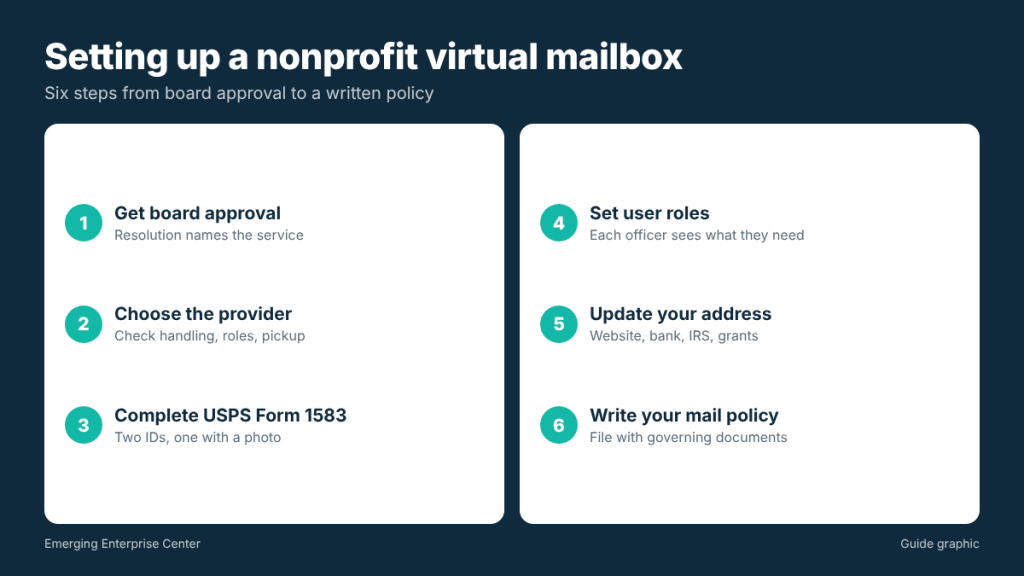
- Get board approval. A short resolution or minutes entry naming the service and the authorized officers creates a clear record and makes future transitions easier.
- Choose the provider. Look at scan quality, how checks are handled, user permissions, package acceptance and whether you can pick up in person.
- Complete USPS Form 1583. Every private mailbox requires this form. It is signed in front of the provider’s authorized staff or a notary, with two forms of identification, one of which must include a photo. Ask the provider how they want authorized officers listed for an organization.
- Set user roles. Give each officer access to what they need. A newsletter volunteer does not need to see bank statements.
- Update your address everywhere. Website, donation pages, bank, IRS, state registrations, grant portals, insurance and vendor accounts.
- Write your mail policy (see below) and file it with your governing documents.
Handling donation checks safely
Checks are where a mail process proves itself. A few habits protect both the organization and the volunteers who handle money:
- Two-person rule. The person who logs incoming checks should not be the only person who deposits and records them. Even a simple split creates accountability.
- Log on arrival. Record the date received, donor name, check number and amount in a shared spreadsheet the day the envelope is scanned.
- Deposit quickly. Set a target, such as deposits within a few business days, and stick to it. Your provider may offer check deposit handling or pickup.
- Send acknowledgments promptly. Donors may need a written acknowledgment for their own tax records, and quick thank-you letters encourage repeat gifts. Your tax advisor can tell you what your acknowledgments must include.
- Reconcile monthly. Compare the check log to bank deposits. Any mismatch gets resolved before the next board meeting.
Worked example: what changes for the treasurer
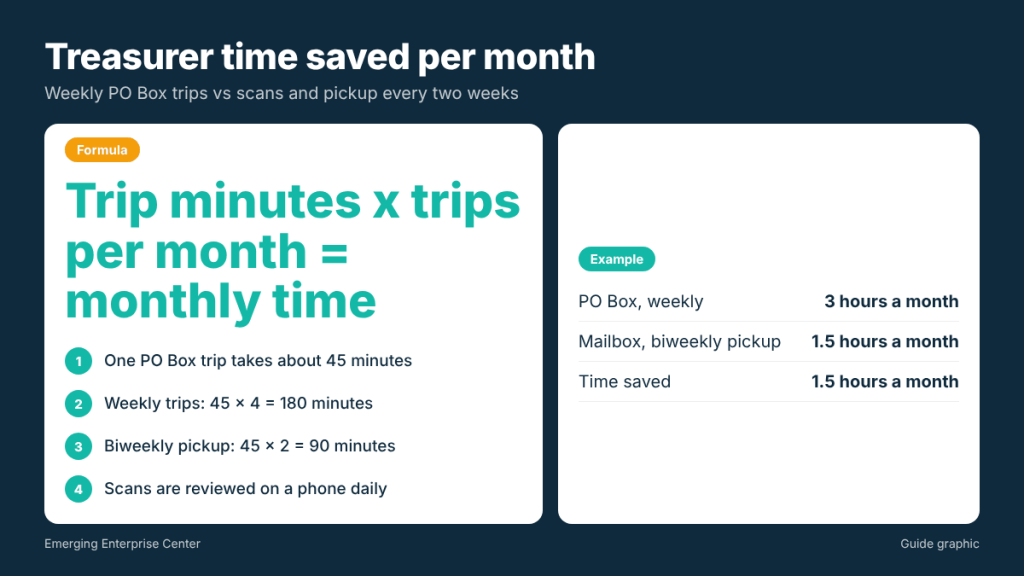
Suppose your treasurer currently drives to a PO Box once a week, a 45-minute round trip including parking and the counter line. That is about 3 hours a month (45 minutes times 4 weeks equals 180 minutes). With a virtual mailbox, she reviews scans on her phone in a few minutes each day and picks up checks once every two weeks, which cuts the driving to about 1.5 hours a month. Just as important, the board chair can see the same scans, so nothing depends on one person’s schedule.
Write a one-page nonprofit mail policy
A short written policy prevents confusion when volunteers change. Cover these points:
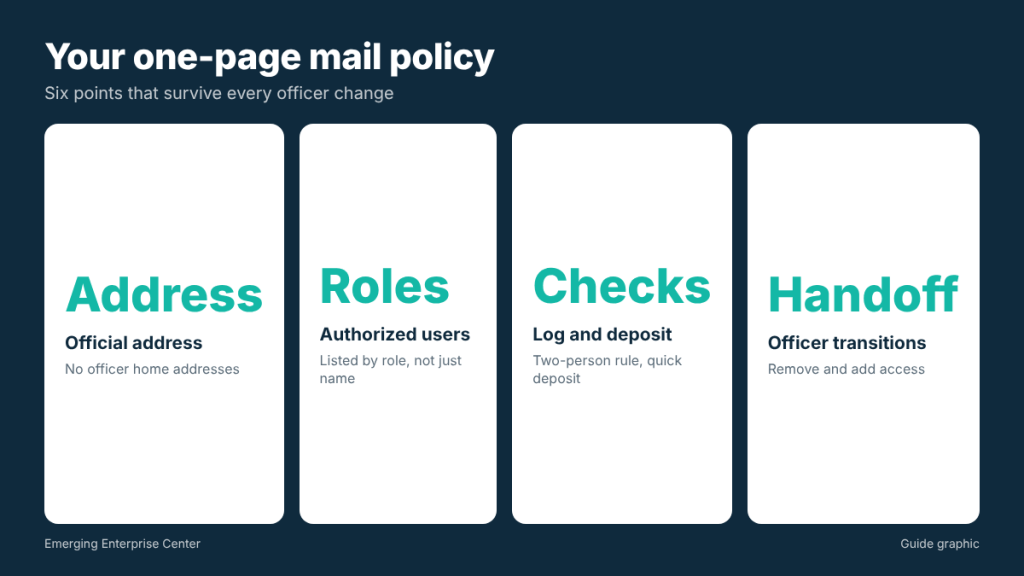
- Official address. State the organization’s mailing address and that no officer’s home address should be used.
- Authorized users. List the roles (not just names) with access, and who approves changes.
- Scanning rules. Which mail gets opened and scanned automatically, and which items stay sealed for a specific officer.
- Checks. How they are logged, who deposits, and how quickly.
- Retention. How long scans and originals are kept, and when unneeded paper is securely shredded.
- Officer transitions. Steps to remove a departing officer’s access and add the new one, including updating Form 1583 details with the provider if required.
Mail you should route with extra care
Some items deserve a named owner and a calendar reminder:
- IRS correspondence, including your determination letter, notices and annual filing reminders. Keep the determination letter permanently.
- State filings and registrations, such as entity reports and any charitable solicitation registrations that apply to you.
- Grant agreements and reports, which often have firm due dates and signature requirements.
- Insurance documents, especially event coverage certificates.
- Bank and card statements, which should go directly to the treasurer and one other reviewer.
Making officer transitions painless
The real test of your mail setup comes when the treasurer or secretary steps down. Build a short handoff checklist and run it at every transition:
- Record the transition in board minutes, naming the incoming officer.
- Remove the departing officer’s login and add the new officer with the right permissions.
- Update the authorized names with the mailbox provider, including any Form 1583 paperwork they require for new recipients.
- Walk the new officer through open items: checks awaiting deposit, grant reports due and any IRS or state letters still being handled.
- Confirm that no organization mail is still being sent to the departing officer’s home, and ask them to pass along anything that arrives there.
Because the address never changes, donors, foundations and agencies keep writing to the same place. Only the people with access change.
Choosing a provider: questions nonprofits should ask
- Can we have multiple users with different permissions?
- How are checks handled, and can we pick them up in person?
- Do you accept packages from all carriers, and how long will you hold them?
- How long are scans stored, and can we export them?
- What happens to mail when an officer leaves and we need to update authorized users?
- Is secure shredding available for mail we do not need?
Frequently asked questions
Can a nonprofit use a virtual mailbox address on IRS forms?
You can generally use it as your mailing address. Some forms also ask for a physical location, so read the instructions and answer each field accurately.
Who should sign Form 1583 for the organization?
Typically an authorized officer completes it, and providers may ask each person who will receive mail to provide IDs. Ask your provider how they handle organizations.
Is a virtual mailbox better than a PO Box for a nonprofit?
If you only receive a few USPS letters, a PO Box may be enough. If you want shared access, scanning or packages from FedEx and UPS, a virtual mailbox usually works better.
What should we do with old donor mail?
Keep what your retention policy and tax advisor recommend, then shred paper containing donor names, addresses or bank details rather than recycling it.
Looking for a stable address for your organization?
Houston nonprofits can use a digital mailbox with scanning and local pickup so officers see every item online and collect checks in person.