Signing up for a virtual mailbox takes ten minutes. Using one well takes a little more thought. Most of the frustrations people report in their first few months, such as surprise fees, a rejected bank application, or a package that bounced back to the sender, come from a handful of predictable virtual mailbox mistakes that are easy to avoid once you know what they are.
This guide covers the errors new users make most often, from the paperwork stage through daily use, with a practical fix for each one. If you have just opened an account, or are about to, run through this list before you start giving your new address to banks, clients and government agencies.
Paperwork and address: the first virtual mailbox mistakes
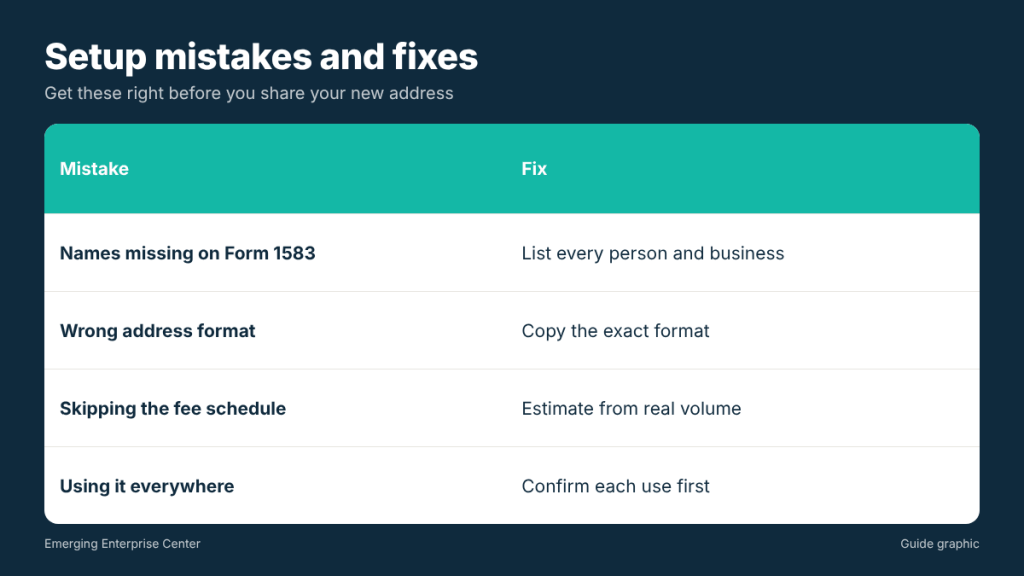
Mistake 1: Treating Form 1583 as a formality
Every virtual or private mailbox in the US operates through a Commercial Mail Receiving Agency (CMRA), and USPS requires each customer to complete Form 1583, the Application for Delivery of Mail Through Agent. It must be signed in front of the CMRA’s authorized staff or a notary, and you need two forms of identification, one with a photo.
New users often rush this step or leave it half-finished, and the provider cannot legally deliver mail until it is complete. Common slip-ups include:
- Listing only yourself and forgetting to add your business name, so mail addressed to the LLC is held or returned.
- Using an expired ID, or an address on the ID that does not match what you wrote.
- Not adding a spouse or partner who also receives mail at the box.
Fix: list every person and business name that will receive mail at the address, check that your IDs are current, and keep a copy of the completed form for your records.
Mistake 2: Formatting the address wrong
Your new address has a box or suite number, and it must appear exactly as the provider instructs. Leaving off the number, or putting it on the wrong line, can send your mail into a sorting limbo. Some users also try to disguise the box number as a “floor” or invent a suite format the provider did not give them. That causes delivery problems and can raise flags with banks.
Fix: copy the format from your welcome email into a text file and paste it every time. Update saved addresses in your browser autofill and online shopping accounts so the old or incomplete version does not creep back in.
Costs and where the address is accepted
Mistake 3: Ignoring the fee schedule
Base plans look inexpensive, but most virtual mailbox plans include a limited number of scans or items per month. Extra scans, forwarding, check deposits, package handling and storage beyond a free period each carry their own charges. Users who skip the fee page are often surprised by their second bill.
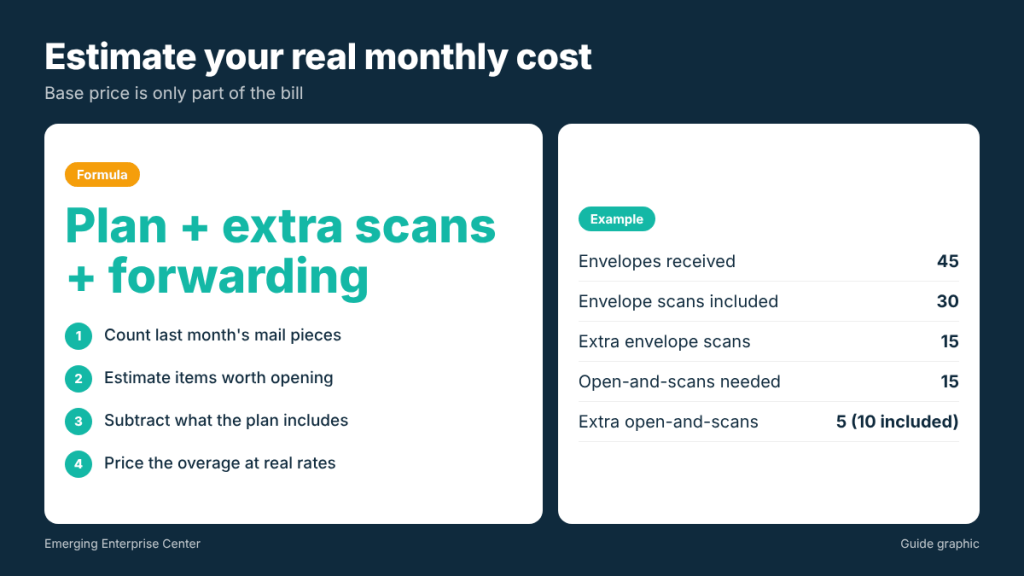
A simple way to estimate your real monthly cost:
- Count the mail pieces you received last month at your old address.
- Estimate how many you will want opened and scanned (typically the bank, tax, legal and client items).
- Estimate how many items or packages you will forward.
- Add the plan price, plus any overage scans and forwarding fees from the provider’s schedule.
For example, if your plan includes 30 envelope scans and 10 open-and-scan requests, and you receive 45 pieces with 15 worth opening, you will pay for 15 extra envelope scans and 5 extra open-and-scans. Run the numbers with your provider’s actual rates before choosing a tier.
Mistake 4: Assuming the address works everywhere
A virtual mailbox gives you a real street address, but not every institution treats it the same way. Before you rely on it, check these uses individually:
- Registered agent: not allowed. A registered agent must have a physical address staffed during business hours to accept legal papers.
- Google Business Profile: Google does not allow a virtual office or mailbox as a verified location. Service-area businesses can hide their address instead.
- Banks and payment processors: many accept CMRA addresses, some ask for a residential address as well, and some decline them. Ask before you apply.
- Government records: rules differ by agency and state. Check each one.
Fix: make a short list of every place you plan to use the address, and confirm the rule for each one before you update it.
Daily handling: reviewing and shredding
Mistake 5: Letting mail pile up unreviewed
The app notifies you, you swipe it away, and three weeks later you have forty unread envelope images. Some of them may be time-sensitive: a tax notice, a jury summons, a renewal reminder. Many providers also charge storage fees once items sit past a set number of days.
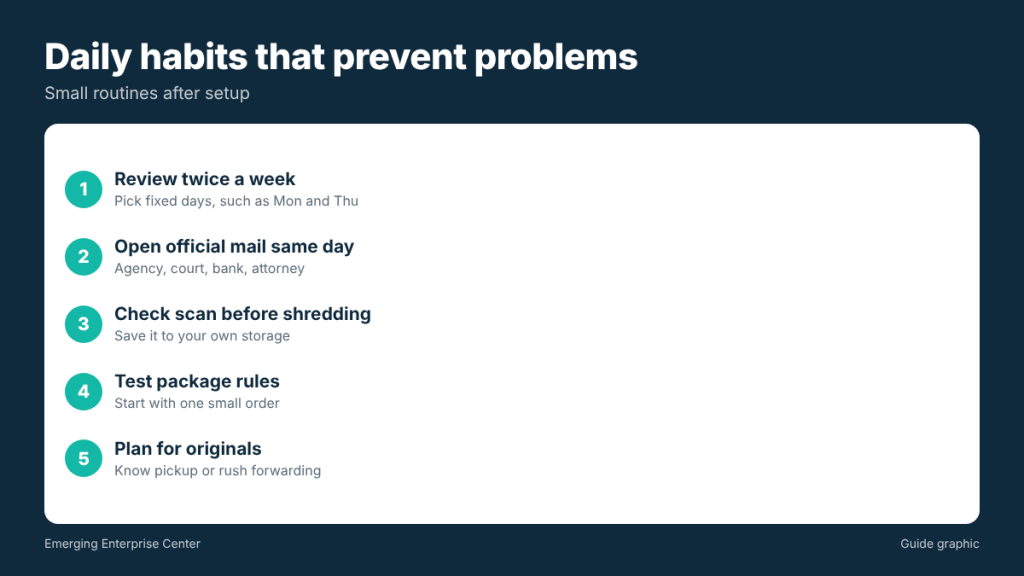
Fix: set a fixed review time, for example every Monday and Thursday morning. For each envelope, choose one action: open and scan, forward, shred or hold. Anything from a government agency, court, bank or attorney gets opened the same day you see it.
Mistake 6: Shredding before you have checked the scan
Shredding is useful, but it is final. New users sometimes request open, scan and shred in one step, then discover the scan was blurry, a page was missed, or the envelope contained an original document such as a title, a signed contract or a check.
Fix: keep the shred step separate for anything important. Review the scan first, download it to your own storage, and only then request shredding. Hold originals of legal and ownership documents rather than destroying them.
Packages and originals
Mistake 7: Forgetting about packages and signatures
Letters are easy. Packages are where many virtual mailbox plans differ. Some app-based services have size limits or charge for every package received; some do not accept certain carriers, perishables or items that need an adult signature. Users who switch their shopping and supplier accounts to the new address before checking these rules end up with returned shipments.
Fix: read your provider’s package policy, test it with one small order, and ask how signature-required deliveries are handled. If you receive regular inventory or supplier shipments, a local store with a physical counter is often a better fit than a remote processing center.
Mistake 8: Not planning for the day you need an original
A scan is enough for most mail. It is not enough when a bank needs the original check, a court needs a wet-signed document, or you need a replacement card that arrived by mail. If your provider is across the country, getting that original means paying for forwarding and waiting several days.
Fix: decide in advance how you will get originals quickly. If you live near your mailbox location, walk-in pickup solves this. If you travel, know your provider’s expedited forwarding options and costs before you need them.
A quick setup checklist
- Form 1583 complete, with every person and business name listed
- Exact address format saved and pasted everywhere
- Monthly cost estimated from your real mail volume
- Each planned use of the address confirmed as allowed
- Two fixed review times per week on your calendar
- Shred only after the scan is checked and saved
- Package and signature policy tested with one order
- Plan for getting originals in a hurry
Frequently asked questions
Can I use a virtual mailbox as my LLC’s registered agent address?
No. A registered agent needs a physical address where someone is available during business hours to accept legal documents. You can usually list a virtual mailbox as your mailing or principal office address instead.
What happens to mail addressed to a name not on my Form 1583?
Providers generally cannot deliver it to you. It may be held while you update the form, or returned to the sender. Add new names as soon as you start using them.
How long will my provider keep unprocessed mail?
It depends on the provider. Many hold items for a set free period and then charge storage. Check your plan terms and review mail regularly to avoid fees.
Is it a mistake to choose the cheapest plan?
Not necessarily, but compare total monthly cost rather than base price. A slightly higher tier with more included scans can cost less overall if you receive a lot of mail.
Want a virtual mailbox you can also walk into?
Getting scans in an app is convenient, but having a real counter nearby makes originals, packages and signatures much easier. See how a Houston digital mailbox with local pickup works and avoid the most common first-month problems.