A workation sounds simple: pack the laptop, pick a city with better weather or family nearby, and keep working for a few weeks. The work part usually goes fine. The trouble is everything around it. A replacement debit card arrives at your empty house. A client mails a signed contract. Packages pile up on the porch. Your bank flags a charge in an unfamiliar city on the day you need to pay a vendor. And the coffee shop Wi-Fi drops five minutes before your biggest call.
This checklist covers what to set up before a working trip of a week to a few months: mail and packages, money and cards, connectivity and devices, client communication, and your home base. Use it as a pre-departure routine and you can actually enjoy the “vacation” part.
Two to four weeks before you leave: mail and packages
Mail is the most common thing workation travelers forget, because most of it is unimportant until the one letter that is not. Decide how mail will be handled based on how long you will be away:
- Short trip (about a week or two): a hold at the post office or a trusted neighbor may be enough, if nothing time-sensitive is expected.
- Longer trip or business mail: a virtual or digital mailbox that scans envelopes lets you see everything as it arrives and decide whether to open, forward, hold or shred.
- Mixed situation: route business mail to a scanned mailbox permanently and handle personal mail with a temporary hold.
Then take care of packages:
- List any orders in transit and expected deliveries, including subscriptions.
- Pause recurring deliveries or change the delivery address for the trip.
- Ask vendors and clients to send anything important to your business mailing address, not your home.
- If you expect a signature-required delivery, arrange for it to go to a staffed location.
Worked example: planning for four weeks of mail
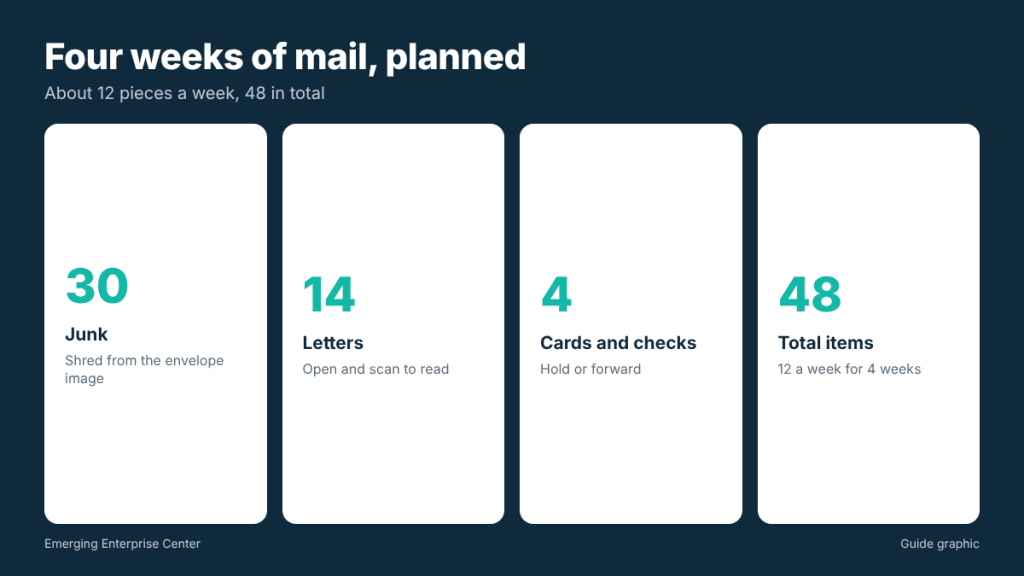
If you normally receive about 12 pieces of mail a week, a four-week trip means around 48 items (12 times 4). With a scanned mailbox, you might find that 30 are junk you can shred, 14 are letters you want opened and scanned, and 4 are items such as cards or checks that should be held or forwarded. (30 plus 14 plus 4 equals 48.) That is a few minutes of decisions per week instead of a pile waiting at home.
One to two weeks before: money and cards
- Check your bank’s travel settings. Many banks no longer require travel notices, but some still offer them. Make sure alerts are on so you can confirm unusual charges quickly.
- Carry a backup card. Bring a second card from a different account, stored separately from your main wallet.
- Check card expiration dates. If a card expires while you are away, its replacement will be mailed to your address on file. Plan for that mail.
- Schedule bills and payroll. Set up automatic payments or calendar reminders for anything due during the trip.
- Keep business and personal spending separate. Use the business card for business costs like coworking passes, and keep the receipts organized as you go.
One week before: connectivity and devices
Your workation is only as good as your internet connection. Prepare for the worst-case day:
- Ask your host about internet speed and whether there is a wired connection or a reliable router.
- Have a backup connection. A phone hotspot or a separate mobile hotspot device gives you an option when the Wi-Fi fails.
- Find a nearby coworking space or library as a fallback for important calls.
- Use a VPN on public networks and turn on multi-factor authentication for business accounts.
- Back up your laptop before you leave and make sure files sync to cloud storage.
- Pack chargers, adapters and a small power strip, plus headphones with a microphone for calls in shared spaces.
Clients, teams and time zones
Most clients will not notice you are away if you plan communication carefully:
- Decide what to share. You do not have to announce a workation, but tell clients if your availability or response times will change.
- Lock in your working hours in the time zone that matters most to your clients, and put it in your calendar settings.
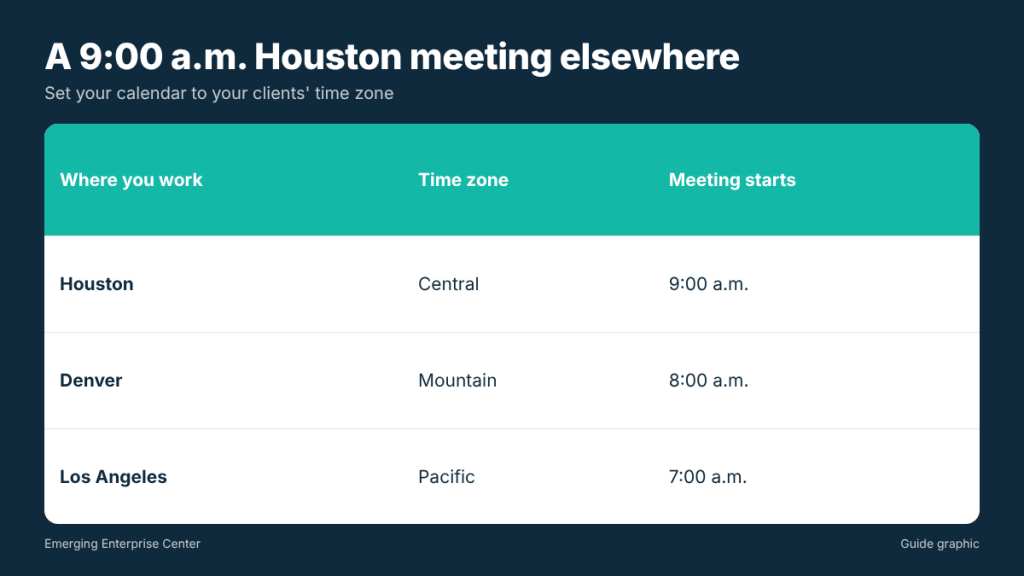
- Double-check meeting times. If you live in Houston (Central Time) and work from Denver (Mountain Time), a 9:00 a.m. Central meeting starts at 8:00 a.m. for you. From Los Angeles (Pacific Time), the same meeting is at 7:00 a.m.
- Plan deadlines around travel days. Do not schedule a deliverable for the day you drive or fly.
- Know how to sign documents remotely. E-signatures cover most contracts. If something needs notarization, find a notary near where you will be staying.
Your home base while you are gone
- Ask a neighbor or friend to check the property occasionally, especially during storm season in Houston.
- Set lights on timers and adjust the thermostat.
- Store important documents securely, and bring digital copies of your ID, insurance cards and key business documents.
- Lock away or shred sensitive papers before you leave rather than leaving them on a desk.
- Check that your home insurance covers an empty home for the length of your trip, if you will be away a long time.
Leave your house-sitter or neighbor a short note with your contact number, the dates you will be away, and what to do if a delivery or official notice shows up at the door. A clear instruction, such as “photograph it and text me,” prevents important items from sitting unnoticed for weeks.
Taxes and longer stays
Working from another state for a short time rarely changes anything for most people, but longer stays can raise questions about state taxes, especially if you work in a state with income tax for an extended period or have employees. If your workation stretches into months, or you are considering making it permanent, ask a tax professional how your situation should be handled.
A daily routine that keeps work on track
Once you arrive, the risk shifts from forgetting something to letting the trip blur your work hours. A light structure helps:
- Start with a five-minute admin check. Review mail scans, bank alerts and your calendar before opening email.
- Protect your core hours. Block the hours your clients expect you online and plan sightseeing around them, not the other way around.
- Work from the same spot. A consistent desk, even a corner of the kitchen table, makes it easier to focus and to take calls with a clean background.
- Keep receipts as you go. Photograph receipts for coworking passes, business meals and supplies the same day.
- End with a quick log. Note what you finished and what is due next, so a travel day does not leave you guessing.
On weekends, decide in advance whether you will check mail and email at all. A planned weekly review, such as Friday afternoon, is usually enough for anything that is not urgent.
The quick pre-departure checklist
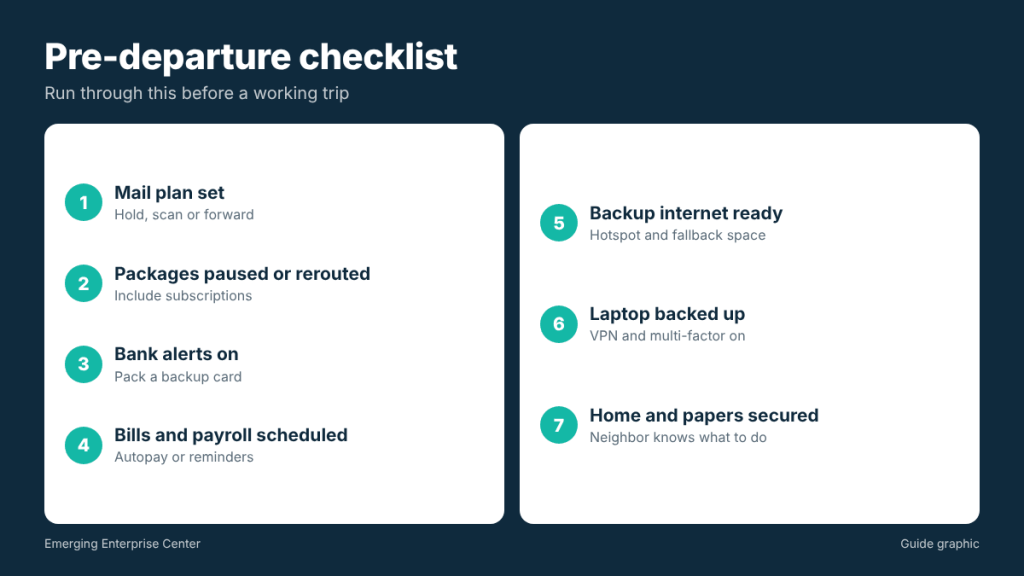
- Mail plan set: hold, scan or forward
- Packages paused or rerouted
- Bank alerts on, backup card packed
- Bills and payroll scheduled
- Backup internet and fallback workspace identified
- Laptop backed up, VPN and multi-factor authentication on
- Calendar set to the right time zone
- Home checked, papers secured
Frequently asked questions
How long can I hold mail while traveling?
Post office holds have limits on how long they last. For trips longer than a short hold allows, or for business mail, a scanned mailbox or forwarding is more reliable.
Can I receive packages while on a workation?
Yes. Send them to your accommodation if allowed, or to a mailbox service that accepts all carriers and can forward to you.
Do I need to tell my bank I am traveling?
Many banks no longer require it, but check your bank’s settings and keep alerts on so you can respond to fraud checks quickly.
What if a document needs a notary while I am away?
Find a notary near your location and bring valid photo ID. Ask the recipient first whether they accept online notarization.
Planning a few weeks away from Houston?
With a digital mailbox from The Postal Spot, you see your mail online, choose what to scan or forward, and pick up the rest when you are back.