
Hiring your first remote contractor is a milestone: a designer, developer, bookkeeper or virtual assistant who takes work off your plate. It is also the moment your business starts collecting someone else’s sensitive information, taking on tax reporting duties and needing contracts that actually protect you. Many founders skip the paperwork because the relationship feels informal. The trouble shows up later, at tax time, during a dispute over who owns the work, or when a contractor leaves with access to client files.
This guide walks through the paperwork for hiring a remote contractor in the order you will need it: classification, the agreement, tax forms, payment records, secure storage and offboarding. It is written for small US businesses hiring their first independent contractors, whether the contractor lives across town or across the world.
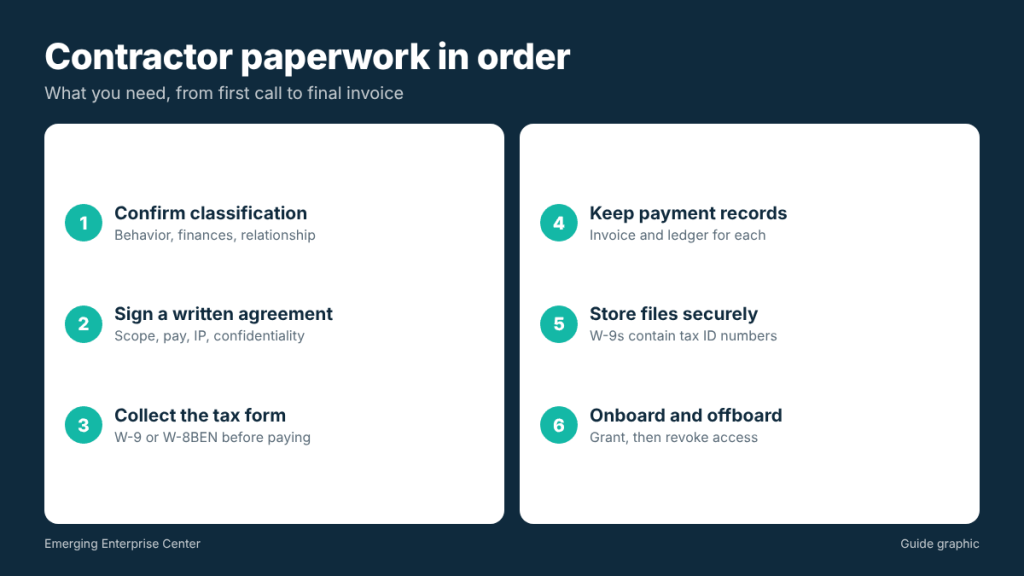
Step 1: confirm the person is really a contractor
Before any paperwork, make sure the relationship is truly independent. The IRS looks at the whole relationship, generally grouped into three areas:
- Behavioral control: do you control how, when and where the work is done, or just the result?
- Financial control: does the worker set their own rates, use their own tools, work for other clients and carry the risk of profit or loss?
- Relationship: is there a written contract, are there benefits, and is the work ongoing and central to your business?
A contractor who sets their own schedule, uses their own equipment, invoices for deliverables and works for other clients usually fits. Someone who works fixed hours under your direction, using your tools, may look more like an employee. Misclassification can bring back taxes and penalties, so if you are unsure, ask a tax professional. State rules can also apply.
Step 2: put a written agreement in place
Even a short independent contractor agreement prevents most disputes. Cover at least:
- Scope of work: deliverables, milestones and what is not included.
- Payment terms: rate, invoicing schedule, due dates and how you pay.
- Intellectual property: who owns the work product. If you want to own it, the agreement should say so clearly, including an assignment of rights.
- Confidentiality: what information is confidential and how it must be protected, including client data.
- Independent status: a statement that the contractor is not an employee and is responsible for their own taxes and tools.
- Data and equipment: how files are stored, which accounts they may access, and what happens to data at the end.
- Termination: how either side can end the relationship and what is owed at that point.
E-signatures are widely used for contractor agreements. Save the fully signed copy in a dedicated contractor folder.
Step 3: collect the right tax form before the first payment
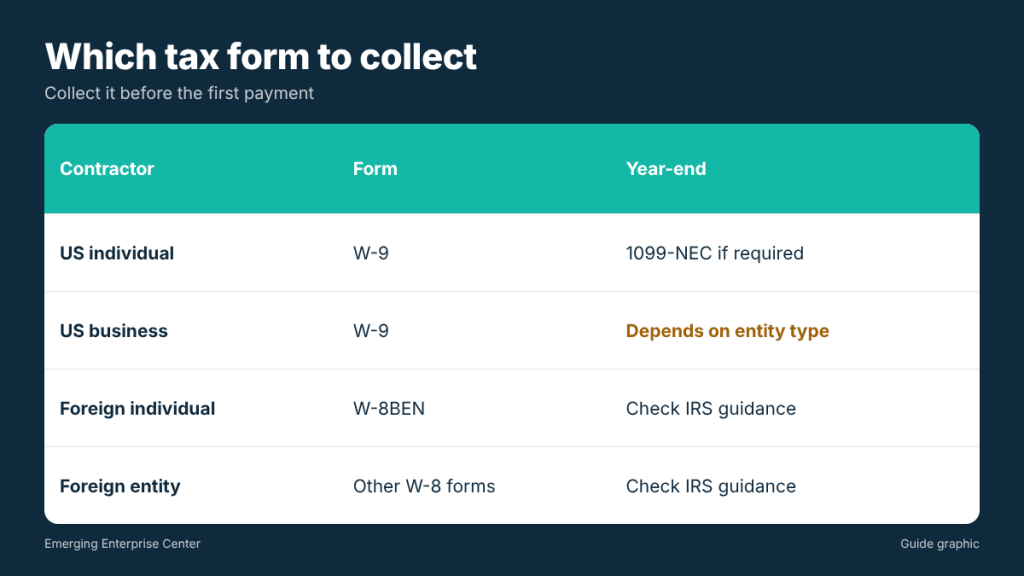
Tax forms depend on where the contractor is a tax resident:
- US contractors: collect Form W-9, which gives you their legal name, tax classification, address and taxpayer identification number (an SSN or EIN). You will use it to prepare any required Form 1099-NEC at year end.
- Foreign contractors: foreign individuals generally provide Form W-8BEN instead of a W-9. Foreign entities use other W-8 forms. Requirements for foreign payments can be complex, so check IRS guidance or ask a tax professional.
Collect the form before you send the first payment. Chasing a W-9 in January, after the contractor has moved on, is a common headache. Check the IRS’s current reporting threshold for Form 1099-NEC each year, and file by the IRS deadline when a form is required.
Step 4: keep clean payment records
Good records make year-end reporting quick:
- Pay contractors only from your business account.
- Require an invoice for every payment, with dates and a description of the work.
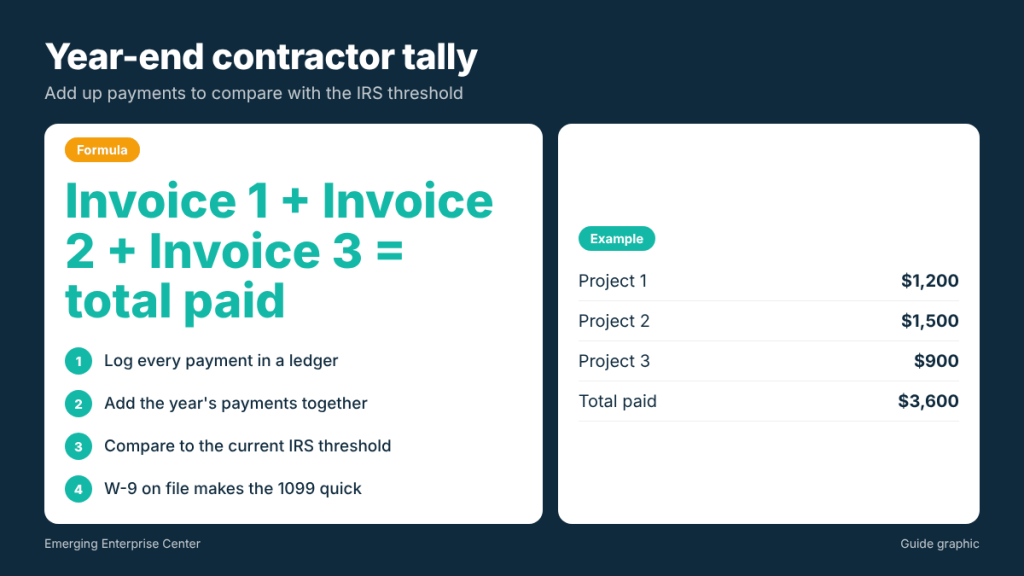
- Log each payment in a contractor ledger: date, invoice number, amount and payment method.
- Note whether payments were made by card or a third-party payment platform, since that can affect who reports the payments. Ask your tax preparer how to treat each method.
Worked example: a year-end tally
You hire a remote designer on three projects during the year, invoiced at $1,200, $1,500 and $900. Your ledger shows the total paid: $1,200 plus $1,500 plus $900 equals $3,600, all by bank transfer. Because you collected a W-9 on day one, you already have the designer’s legal name, address and TIN. At year end, you compare the $3,600 total to the current IRS reporting threshold and, if a 1099-NEC is required, prepare it in a few minutes instead of chasing information.
Step 5: store contractor paperwork securely
A W-9 contains a taxpayer identification number, often a Social Security number. That makes your contractor files a target for identity thieves. Protect them:
- Use a restricted folder. Store W-9s, W-8s and signed agreements in a folder only you and your bookkeeper can open.
- Avoid email attachments. Ask contractors to upload tax forms through a secure portal or encrypted method rather than plain email when possible.
- Do not print unless needed. If you do print, keep paper copies locked away.
- Set a retention period. Keep tax records for as long as your tax professional advises, then destroy them.
- Shred, do not recycle. Paper W-9s, signed agreements and invoices with account details should be shredded when no longer needed.
Step 6: onboard and offboard with a checklist
Onboarding
- Signed contractor agreement saved
- W-9 or W-8 collected and stored securely
- Payment method and invoicing details confirmed
- Access granted only to the tools and files the work requires
- Confidentiality expectations reviewed, especially for client data
Offboarding
- Final invoice received and paid
- All work product and source files delivered
- Access revoked from shared drives, email, software and password managers
- Company data returned or deleted, with written confirmation if sensitive
- Any company equipment returned
- Paper copies of sensitive records shredded or filed per your retention schedule
A simple contractor folder structure
Set up one folder per contractor with the same subfolders every time, so anyone helping with your books can find things:
- Agreement: the signed contract and any amendments or statements of work.
- Tax: the W-9 or W-8 and copies of any 1099 forms you filed. Restrict access to this subfolder.
- Invoices and payments: each invoice, named by date and invoice number, plus your payment ledger.
- Access log: a short note of which accounts and files you granted, with dates, so offboarding is a checklist rather than guesswork.
The structure takes five minutes to set up and saves hours when you have several contractors or when your tax preparer asks for documents.
Remote-specific considerations
- Time zones: put deadlines in a single time zone in the agreement.
- Currency: for foreign contractors, state the payment currency and who covers transfer fees.
- Mail: if contractors send paper invoices or you mail forms like 1099s, use a business mailing address rather than your home.
- Local laws: contractors in other states or countries may be subject to their own local rules. Ask a professional if you hire internationally on an ongoing basis.
- Equipment: if you ship a laptop or other gear to a contractor, record the serial number, the shipping tracking number and the agreed return date in their folder.
- Communication records: keep major decisions, scope changes and approvals in writing, in email or your project tool, so the record does not live only in video calls.
Frequently asked questions
Do I need a contract for a small one-time project?
A short written agreement is still wise. It settles ownership of the work and payment terms, which are the most common sources of disputes.
When should I ask for a W-9?
Before the first payment. It is much easier to collect while the contractor is starting the work.
Do foreign contractors fill out a W-9?
Generally no. Foreign individuals usually provide Form W-8BEN. Check IRS guidance for your situation.
How should I get rid of old W-9 forms?
After your retention period ends, shred paper copies and securely delete digital files. Never throw them away whole.
This article is general information, not legal or tax advice. Consult a qualified professional about classification and reporting.
Old contractor files with SSNs in a drawer?
When their retention period is over, The Postal Spot’s walk-in shredding service destroys W-9s, contracts and invoices securely in Houston.