Every new business hits the same question within the first few weeks: what address do we put on the website, the business cards, the bank account and the state filing? Your home address works, technically, but it puts your family’s front door on public records and Google Maps. A PO Box looks like a quick fix until a supplier tries to send something by FedEx. And virtual mailboxes promise to solve everything from an app.
Each option has a real place, and the right choice depends on what kind of mail you get, who sends it, and whether you ever need to pick something up in person. This guide breaks down the three main choices so you can pick the one that fits how your business actually runs.
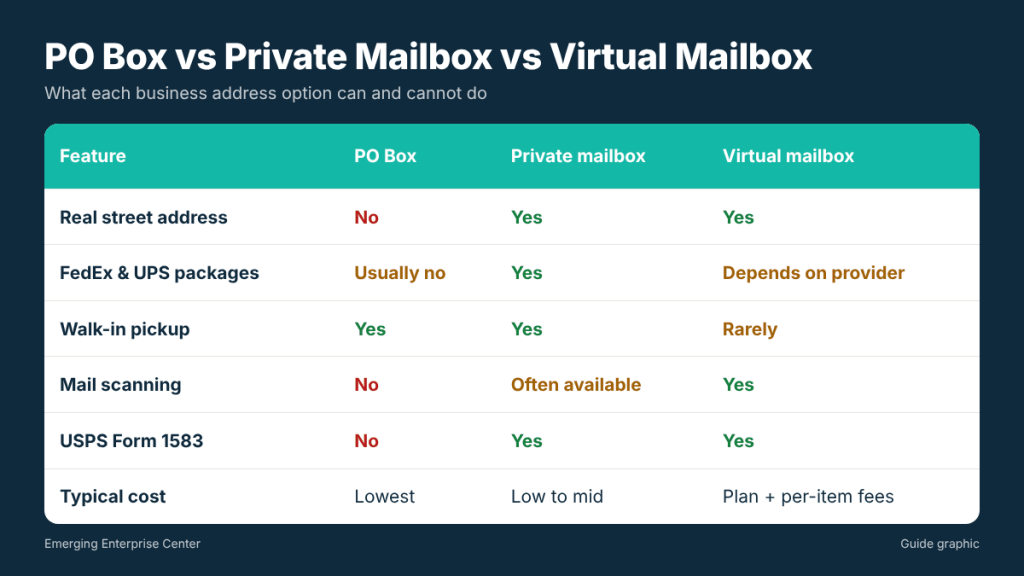
The three options at a glance
- PO Box: a locked box inside a post office, rented directly from USPS. Cheap and secure, but limited to USPS mail in most cases.
- Private mailbox (PMB): a box at a private mail and shipping store, known officially as a Commercial Mail Receiving Agency (CMRA). You get a real street address with a suite or box number.
- Virtual mailbox: a service that receives your mail at a street address, scans the envelope, and lets you choose to open and scan, forward, shred or hold each item from an online dashboard.
In practice, the line between the last two has blurred. Many local mail stores now offer digital mailbox plans, where your mail arrives at a physical store you can visit, and you still get scans and notifications online.
PO Box: what it does well and where it falls short
A PO Box is the oldest and usually the cheapest way to separate business mail from your home. USPS rents boxes in several sizes, with pricing that varies by location and term. Mail is delivered into a locked box that only you can open, which makes it a solid choice for checks and sensitive letters.
The limitations matter for most businesses, though:
- Carrier restrictions. A standard PO Box receives USPS mail and packages. FedEx, UPS, DHL and freight carriers generally will not deliver to a PO Box. Some post offices offer a “street addressing” option that lets private carriers deliver using the post office’s street address, but it is not available everywhere.
- It looks like a PO Box. Customers, lenders and some platforms recognize “PO Box” instantly. Many online marketplaces, payment processors and state filings require a physical street address, and a PO Box will not qualify.
- Post office hours. Lobby access varies, and package pickup is tied to counter hours. If something too large for your box arrives, you get a slip and wait in line.
A PO Box is a good fit for a sole proprietor who mostly receives letters and checks by USPS and does not need to present a street address anywhere.
Private mailbox: a real street address with a person behind the counter
A private mailbox at a mail and shipping store gives you a street address formatted like a suite, for example “2616 Main Street, #120.” Because the store is a registered CMRA, it can legally receive mail on your behalf, and it accepts packages from every carrier: USPS, FedEx, UPS, DHL and freight deliveries.
That carrier flexibility is the biggest practical difference. If you buy inventory online, receive samples, or deal with vendors who only ship FedEx or UPS, a private mailbox means nothing gets refused or sent back. Staff sign for packages, hold them securely, and often text or email you when something arrives.
Other benefits that business owners tend to value:
- Privacy. Your home address stays off your website, invoices and Google Business listings.
- Longer access. Many stores offer extended or after-hours box access, depending on location.
- Extra services in one place. Shipping, notary, printing and shredding are often available at the same counter, which saves trips.
- Mail forwarding. If you travel, most stores will forward mail to wherever you are for a fee.
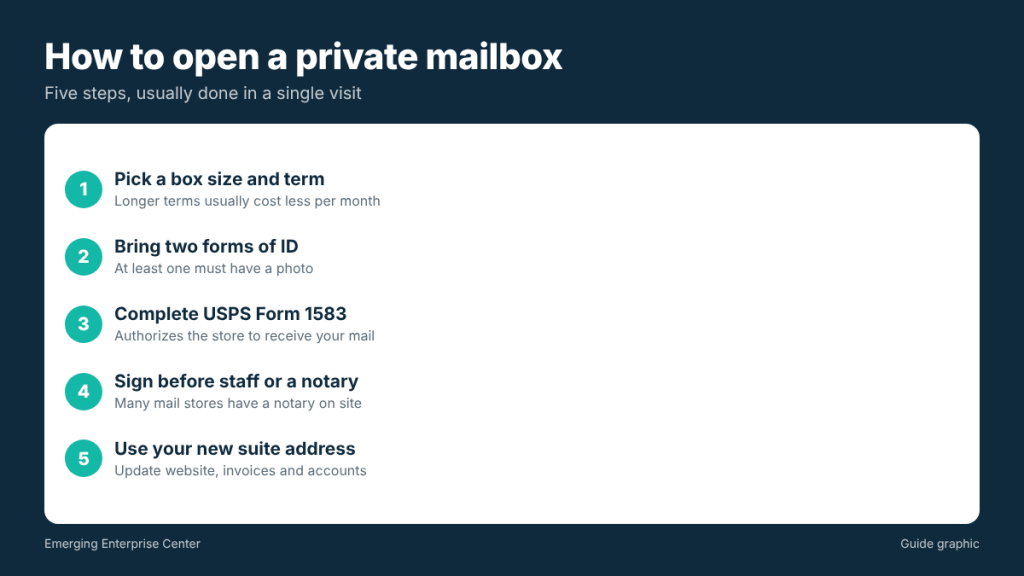
What you need to open one: USPS Form 1583
Federal rules require every private mailbox customer to complete USPS Form 1583, the Application for Delivery of Mail Through Agent. It authorizes the store to receive mail for you or your business. You will need two forms of identification, one of which must include a photo, and the form must be signed in front of the store’s authorized staff or a notary. Many mail stores have a notary on site, so you can open the box and finish the paperwork in one visit.
Virtual mailbox: mail you manage from your phone
A virtual mailbox takes the private mailbox idea online. Mail arrives at a street address, gets logged, and you see an image of every envelope in an app. From there you decide what happens: open and scan the contents, forward it, shred it or hold it for pickup.
This is a strong option if you:
- Travel often or work fully remotely
- Run a business registered in one state while living in another
- Get mostly letters, statements and notices rather than packages
- Want a searchable digital archive of business mail
The trade-off is distance. National virtual mailbox apps often route your mail to a processing center you will never visit. If a package or a certified letter needs a signature, or an original document needs to be picked up quickly, you depend on forwarding times and fees. That is why local digital mailbox plans are popular: you get the scanning and app convenience, and when you need something in hand, you can walk in and collect it the same day.
Which address can you use for what?
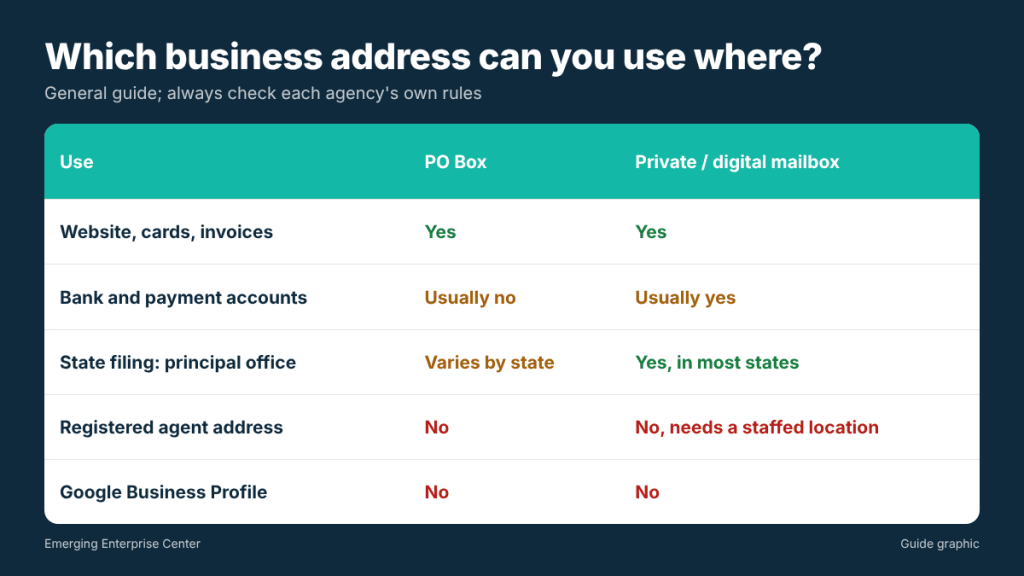
Rules differ by agency and platform, so always check the specific requirement. As a general guide:
- Business cards, website, invoices: any of the three works. A street address with a suite number usually looks more established than a PO Box.
- Bank accounts and payment processors: most require a street address. A private mailbox is usually accepted; some institutions ask additional questions about CMRA addresses.
- State business filings: your principal office address can often be a private mailbox. Your registered agent address, however, must be a physical location where someone is available during business hours to accept legal documents. A mailbox alone does not meet that requirement.
- Google Business Profile: Google does not allow a PO Box or virtual office as the location for a verified listing. Service-area businesses can hide their address instead.
Cost comparison: what to expect
Prices vary by city, box size and contract length, so treat these as typical ranges rather than quotes:
- PO Box: usually the lowest monthly cost, paid in 3, 6 or 12 month terms.
- Private mailbox at a local store: often starts around the cost of a PO Box or slightly more, with discounts for longer terms. Some Houston stores advertise plans from about $15 per month.
- Virtual mailbox apps: a monthly plan with a set number of scans, plus fees for extra scans, forwarding and postage.
When you compare, add up the extras. A cheap base plan can become expensive once you pay for every scan, check deposit or forwarded package.
How to choose in five questions
- Do you receive packages from FedEx or UPS? If yes, rule out a basic PO Box.
- Do you need a street address for your bank, marketplace or state filing? If yes, choose a private or digital mailbox.
- Are you local or remote? Local owners benefit from walk-in pickup; remote owners need scanning and forwarding.
- How much mail do you get? Heavy volume makes per-scan fees add up quickly.
- Do you need other services? If you regularly ship, notarize or print, a full-service mail store saves time.
Frequently asked questions
Can I use a private mailbox as my LLC’s address?
In most states you can list a private mailbox as your business’s mailing or principal office address. You cannot use it as your registered agent address, which must be a staffed physical location.
Is a private mailbox address legal to use on my website?
Yes. It is a real street address operated by a registered CMRA. Format it with the box number as a suite or “#” number, as the store instructs.
What is the difference between a virtual mailbox and a digital mailbox?
The terms are often used interchangeably. “Digital mailbox” usually refers to a local store that adds scanning and online notifications to a physical mailbox, while “virtual mailbox” often refers to app-based services with remote processing centers.
Do I need a notary to open a mailbox?
Your Form 1583 must be signed in front of the store’s authorized staff or a notary. Stores with an in-house notary can handle it during your first visit.
Looking for a business address in Houston?
If you are in the Galleria, Uptown or Briargrove area, The Postal Spot offers private mailbox rental in Houston with a real street address, package receiving from every carrier, and an on-site notary for your Form 1583.