Consultants and small agencies sell expertise, not inventory, so it is easy to assume mail does not matter. Then a client mails a signed contract, a retainer check or a confidential document. A government buyer wants hard copies of a proposal. Your insurance carrier sends a certificate a client is waiting on. And the address printed on your proposals and letterhead is your apartment, because you never set up anything else.
A virtual mailbox gives a consulting practice or a small agency a professional address, remote access to mail and a clean way to share it with a team. This guide covers what consultants actually receive, how to protect client confidentiality, how to route mail for a small team, and how to decide which setup fits your practice.
What consultants and agencies typically receive
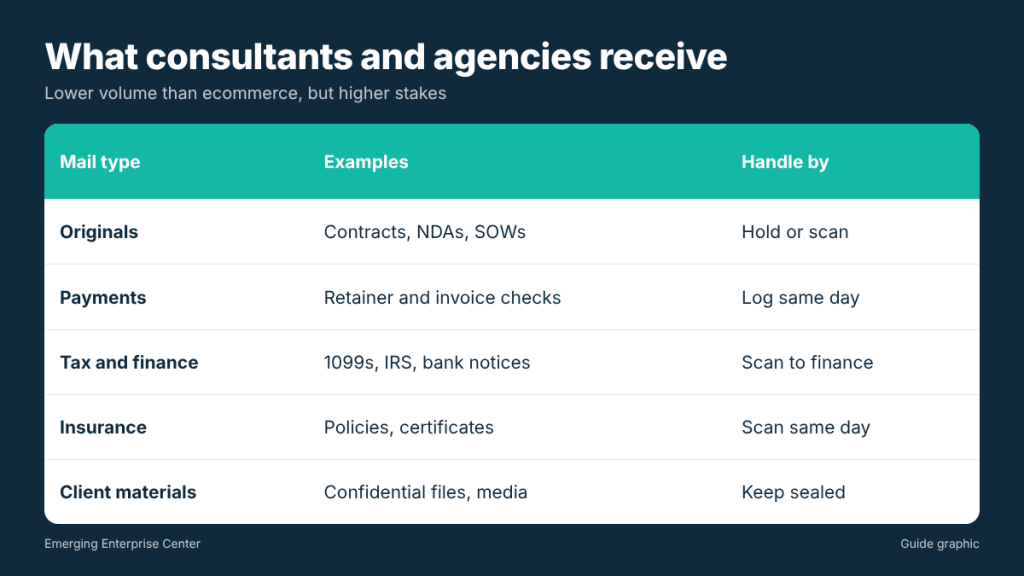
The mail is lower in volume than an ecommerce business, but higher in stakes. Common items include:
- Signed agreements and originals: contracts, NDAs, statements of work and amendments that some clients still prefer on paper.
- Payments: retainer and invoice checks, especially from larger companies, public agencies and long-time clients.
- Tax and financial mail: 1099 forms from clients, bank notices, state tax correspondence and IRS letters.
- Insurance documents: professional liability policies and certificates of insurance that clients request before work begins.
- Licensing and association mail: professional license renewals, continuing education materials and membership notices.
- Client materials: confidential files, physical media, product samples and items for review.
Why a home address works against you
Your address appears in more places than you might expect: proposals, invoices, contracts, email signatures, LinkedIn, conference badges and public business filings. For a solo consultant, that puts a home address in front of every prospect and in shared documents you no longer control.
There is also a credibility angle. A street address with a suite number reads like an established practice. And when you hire your first contractor or employee, a home address forces you to choose between handing over keys or being the only person who can ever check the mail.
Protecting client confidentiality
Consultants often receive information covered by NDAs or professional obligations. Scanning everything by default is convenient, but it is not always appropriate. Build confidentiality into your mail setup:
- Use “do not open” rules. Mark certain senders or envelope types to stay sealed until you pick them up, or to be forwarded unopened.
- Ask about provider handling. Find out who opens and scans mail, whether staff are trained on privacy, and how scans are stored and protected.
- Limit access by role. Not every team member needs to see every client’s mail.
- Tell clients how to send sensitive items. Some may prefer a signature-required delivery or a secure file transfer instead.
- Dispose of paper securely. Once a document is scanned and no longer needed, shred it instead of recycling it.
Routing mail for a small team
Once an agency grows past one person, the question becomes who sees what. A simple routing table, agreed in advance, saves endless forwarding.
Worked example: a four-person agency
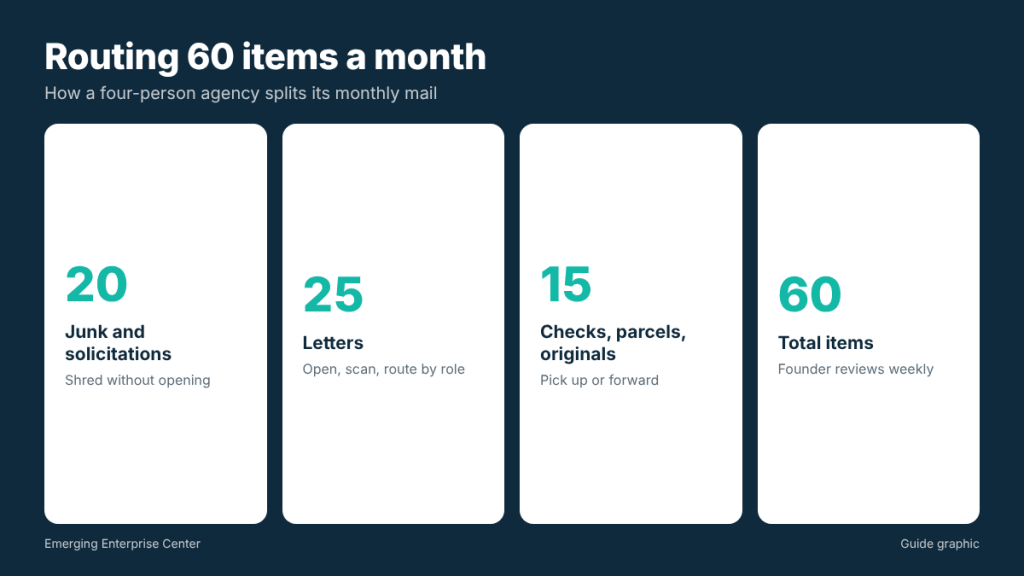
Picture a four-person marketing agency that receives about 60 items a month. After a month of tracking, they find roughly 20 are junk or solicitations, 25 are letters worth scanning, and 15 are checks, packages or originals that need physical handling. (20 plus 25 plus 15 equals 60.) Their routing rules look like this:
- Junk and solicitations (20): shred without opening, after a quick look at the envelope image.
- Letters (25): open and scan. Finance mail goes to the founder and bookkeeper. Client mail goes to the account lead.
- Checks (part of the 15): logged the same day and picked up for deposit twice a week.
- Packages and originals (rest of the 15): held for pickup, or forwarded to the team member doing the work.
The founder reviews the full mail list once a week. Everyone else sees only their part. That one-hour setup saves daily questions about whether something arrived.
Handling checks without slowing cash flow
For a consulting practice, a check sitting in a mailbox is unpaid revenue. Agree on a few rules so payments move quickly:
- Same-day alert, same-day log. When a check arrives, record the client, invoice number and amount in your accounting system so the invoice shows as paid pending deposit.
- Fixed pickup days. Two set days a week keeps deposits predictable. If your provider offers check deposit handling, compare it to your own pickup routine.
- Encourage electronic payment. Add ACH or card payment details to invoices so fewer clients mail checks in the first place. Many larger clients can switch once you send the details on letterhead.
- Keep a copy. Scan the front of each check and the remittance slip before depositing, then file it with the invoice.
Certificates of insurance and contract originals
Clients, especially larger companies and public agencies, may refuse to start work until they receive a certificate of insurance or a countersigned original. Ask your insurance agent to email certificates directly to clients when possible, and flag any envelope from your carrier or a client’s legal department for same-day scanning. If an original must be signed and returned, plan for pickup, signature and outgoing shipping in one visit.
Setting up a virtual mailbox for your practice
- Decide what you need. Scanning only, or scanning plus package receiving and local pickup?
- Complete USPS Form 1583. It is required for every private mailbox and must be signed in front of the provider’s authorized staff or a notary, with two forms of ID, one with a photo.
- Set up user access and rules for confidential senders, checks and junk.
- Update your address on contracts, proposals, invoices, your website, LinkedIn, bank and insurance.
- Tell active clients. Send a short note with the new address and how to send originals or payments.
- Keep forwarding on at the old address during the transition.
Virtual mailbox, coworking or a small office?
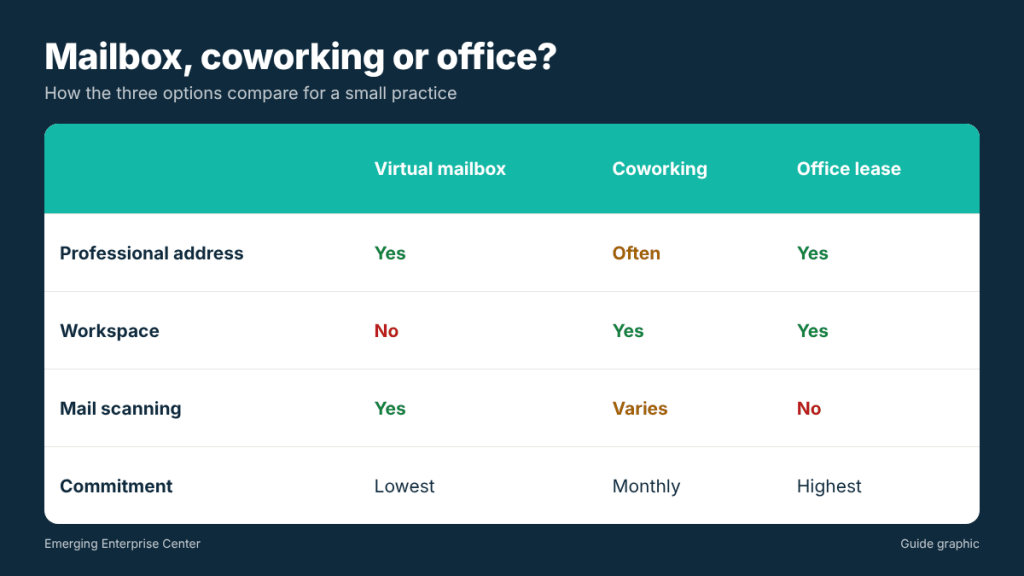
Many consultants weigh these three options. Here is how they compare on the things that matter most:
- Virtual mailbox: professional address, remote access and scanning. No workspace. Usually the lowest monthly commitment.
- Coworking membership: a place to work and meet, and often a mailing address. Mail handling and scanning vary, and some plans limit address use.
- Private office lease: full control and a dedicated space, with the highest commitment and someone still needs to collect mail.
A common pattern is to start with a virtual mailbox, book meeting rooms by the hour when needed, and only lease space once the team regularly works together in person.
Whichever you choose, keep the mailing address separate from the decision about workspace. If you later move from coworking to a private office, or back to home, a mailbox address that never changes means your contracts, invoices, bank records and client files stay accurate. Changing workspace becomes a logistics question instead of an address-change project across dozens of accounts.
Features worth paying for
- Multiple users with permissions
- Sealed-mail and do-not-scan options
- Quick check handling and local pickup
- Package acceptance from all carriers
- Secure, searchable scan storage with export
- Shredding for mail you do not want to keep
- Access to notary services for contracts and affidavits that need one
Frequently asked questions
Can I put a virtual mailbox address on contracts and proposals?
Yes, as your business mailing address. If a contract or form asks where you physically operate, answer that question accurately.
Is it safe to have client documents scanned?
It depends on the provider and your obligations. For sensitive items, use sealed-mail rules and pick up in person, and ask the provider how scans are secured.
Can my team members each have access?
Many providers support multiple users. Ask whether each person needs to be listed on Form 1583 and how permissions work.
Do I still need a registered agent if I have a virtual mailbox?
Yes, if you have an LLC or corporation. A registered agent must have a physical address staffed during business hours, which a mailbox alone does not satisfy.
Running a consulting practice in Houston?
A digital mailbox in the Galleria area gives you a professional address, mail scanning for your team and local pickup for checks and signed originals.